- What is the difference between Network, Cyber and Information Security?
- Cybersecurity vs Network security vs Information security (Video)
- What is Assurance and Compliance and how it can be applied to NGFWs?
- Certification Roadmap (Network, Cyber, Cloud and Information Security/GRC/ITSM)
- ***Standards, Regulations, Frameworks and Compliance: CIS CSC v8/CIS Benchmarks/ISO27001:2022/ISO27002:2022/PCI-DSS v4/NCSC CAF/NCSC Cyber Essentials/GDPR/NIST CSF/NIST SP 800-53/NIST SP 800-171/SOC2/MITRE ATT&CK/COBIT/CSA CCM/CMMC/HIPPA/OWASP Top10***
- CIS (Center for Internet Security) Controls v7.1 and v8 (Download Link)
- CIS v7 / v8 Security Controls Navigator (Mapping to other Frameworks)(CIS Contorls v8 (18 controls) (153 safeguards or subcontrols)CIS Contorls v7.1 (20 controls) (171 safeguards or subcontrols)(IG1/IG2/IG3)(IG1/IG2/IG3))
- The 18 CIS Critical Security Controls (Formerly the SANS Critical Security Controls (SANS Top 20))
- CIS (Center for Internet Security) Critical Security Controls and Mapping to other Frameworks (pdf)
- CIS Security Controls v7 / v8 and mappings
- NIST (National Institute of Standard and Technology) SP 800-53 Full Control List
- The 20 NIST Control Families
- NIST CSF (Cyber Security Framework
- *****Security Compliance, Best Practices and Hardening******
- NCSC (National Cyber Security Centre) S2S IKE VPN Parameters
- CIS Benchmarks (Cisco(Routers/Switches/FTD)/Fortigates/Palo etc.)
- Palo Alto PCI Compliance White Paper
- Palo Alto NIST CSF Compliance Whitepaper
- Palo Also Compliance NCSC CSP (Cloud Security Principles) 2022 Whitepaper
- Fortinet ISO 27001 Compliance
- Fortinet NIST Compliance
- Fortinet PCI DSS Compliance
- Implementing Best Practices for Zero Trust (Video)
- Best Practices to Achieve Zero Trust in Your Internet Edge (Video)
- Security Best Practices Checklist for Palo Alto Networks Next-Generation FireWalls (Excel Checklist)
- Firewall Hardening Best Practices for Palo Alto Networks (Video Explaining BPA Checklist)
- Cisco Guide to Harden Cisco IOS Devices
- Firepower Threat Defense – Common Practice Guide Walkthrough (Video)
- Cisco FTD Policy Management Common Practices (pdf)
- Cisco FTD Device Management Common Practices (pdf)
- ***********Useful Network and Security Tools***********
- Useful Links
- Sending Additional Information via Syslog (All Vendors)
- Auvik Network Monitoring and Management Tool for MSPs (Managed Service Providers)
- Auvik RMM (Remote Monitoring and Management) fo MSP Walk Trough
- Cloud Based Multi Tenant OpenVPN (Cloud Connexa)
- Cloud Based Radius as a Service (RaaS)
- Manage Engine Firewall Analyzer (Firewalls Compliance Tool)(Firewalls Audit and Compliance Tool)
- Best Practice Assessment (BPA) Tool – Introduction
- Best Practice Assessment Plus (BPA+) Overview Video
- Meraki PCI Compliance Reports
- Tenable Nessus Professional Overview(Vulnerability Scanner and Audit Tool)
- Nmap Tutorial to find Network Vulnerabilities(Vulnearbilities Scanner)
- ********MSP (Manged Service Provider)/MSSP (Managed Security Service Provider)/CSP (Cloud Service Provider)**********
- 1 of 3: What is an MSP? Managed Service Providers in the tech industry
- 2 of 3: Valuing an MSP business for potential sale. Exit strategy for entrepreneurs.
- 3 of 3: What is involved in selling your MSP business? Entrepreneurs need an exit strategy.
- **(Consultant/Engineer/Project Engineer (Professional and Managed Services (MSP/Managed Service Provider))**
- HLD (High Level Design) vs LLD (Low Level Design)
- Network Professional Services/Consultancies
- Common Network Architectures/Designs/Topologies
- Cisco Device Hardening for IOS, IOS-XE, IOS-XR, NX-OS
- Cisco Parts and Materials (BOM (Bill of Materials)/Cisco CCW (Cisco Commerce Renewals)/SKU Tool)
- Check Device Coverage
- Power Connectors (Video)
- UK BS1363 Male Plug Angled Down to IEC320 C13 Connector (Kettle Lead) Vs. IEC320 C14 Male Plug to C13 Connector (Jumper Cord)
- UK BS1363 Male Plug Angled Down to IEC320 C13 Connector (Kettle Lead) Vs. IEC320 C14 Male Plug to C13 Connector (Jumper Cord)
- 5 Considerations: Sizing Your Next-Gen Firewall (NGFW)
- ***********Check Point************
- CCSA R80 Student Manual
- CCSE R80 Student Manual
- Best Practices – Backup on Gaia OS
- How to keep your Security Gateways up to date
- Introduction to R81.10 Jumbo Hotfix Accumulator
- List of All Resolved Issues and New Features in R81.10 Jumbo Hotfix Accumulator
- Check Point Release Map
- Check Point Recommended Version and Release Terminology
- End Of Life Announcements (Software and Hardware)
- Upgrade/Download Wizard
- Check Point Upgrade Path and Management Servers and Security Gateways Compatibility Maps
- Compatibility of Jumbo HFA Takes between different releases
- Supported Upgrade Paths
- Check Point Upgrade Map (pdf)
- Quantum 6700Security Gateway Data Sheet
- Capture and Monitor traffic Checkpoint
- Checkpoint Evaluation License steps (cplic)
- Checkpoint Firewall Packet Flow
- Nokia IPSO Checkpoint CLI Commands
- Checkpoint Commands1
- Checkpoint Commands2
- Checkpoint Commands3
- 0.0 CCSA R80 CBT Nuggets
- 0.1 Checkpoint Backward Compatibility Map
- 0.2 Checkpoint Firewall Packet Flow
- 1.0 How IPsec Site to Site VPN Tunnels Work
- 1.1 Remembering the 5 Things to Negotiate in IKE Phase 1 (IPsec)
- 1.2 How to Set Up a Site-to-Site VPN with Check Point Gateways Managed by the same Management Server
- 1.3 How to set up a Site-to-Site VPN with a 3rd-party remote gateway
- 1.4 Checkpoint Site to Site VPN (R80)
- 1.5 Site to Site VPN (R75/R76/R77)
- 1.6 3rd party VPN/Invalid ID information/No valid SA (Summary subnet sent)
- 1.7 VPN Debugging Commands CLI
- 2. Connection to the Security Gateway with WinSCP fails
- 3. Check Point – How To Collect CPinfo – CLI
- cpinfo -l -z -o /var/log/FW01_2_6_2020_15_50.info.tar.gz
- 4.0 Check Point R77 Features
- 5.0 Building a Checkpoint Network
- 5.1 Checkpoint Management Server Installation
- 5.2 Checkpoint Security Gateway Installation & Adding to Mgmt Server
- 5.3 Interfaces Configuration and Default Route
- 5.4 Basic Security Policy and NAT
- 5.5 Checkpoint Security Policy Rules
- 5.6 Checkpoint NAT – Part 1
- 5.7 Checkpoint NAT – Part 2
- 5.8 Checkpoint Installation/SIC/Basic Setup
- 6.0 Basics of SmartView Monitor
- 6.1 Checkpoint Smartview Tracker Logging
- 7.0 Checkpoint Failover doesn’t work on Azure
- 8.0 Checkpoint Log Collection (LogRhythm) (OPSEC LEA)
- 8.1 Syslog Integration with CheckPoint
- 9.0 Port Scan Best Practices Checkpoint
- 9.1 Port Scan and DDoS Best Practices Checkpoint
- 10.0 Power Shell Script to create objects from list of IPs (Dbedit)
- 10.1 Using a dbedit script to create new network objects and network object groups
- 10.2 Checkpoint Firewall CLI tool “dbedit” and quick lab examples
- 11.0 Capture and Monitor traffic Checkpoint (CLI/Commands)
- 12.0 Adding/Renewing a new 3rd party VPN Certificate Checkpoint – Step 1
- 12.1 Adding/Renewing a new 3rd party VPN Certificate Checkpoint – Step 2
- 13.0 How do Domain Objects work?
- 13.1 Domain Objects in R80.10 and above
- 14.0 New R80.20 Commands
- 15.0 Route all traffic from Remote Access clients, including internet traffic, through Security Gateway
- 16.0 Restrict Smartconsole and SSH access to the Management (user cpconfig or edit file)
- 17.0 Check Point Upgrade Service Engine (CPUSE) – Gaia Deployment Agent
- 18.0 Video Lectures
- 18.1 ClusterXL/CoreXL/SecureXL
- 18.2 CCSE Commands List
- 18.3 Checkpoint Common Ports
- 18.4 CCSE R80 Syllabus
- 19.0 Configuring DHCP relay through Site-to-Site VPN on GAIA embedded Appliances
- 20.0 How to troubleshoot IPS update [scheduled and manual] issues
- 21.0 Domain Objects in R80.x FQDN and non FQDN
- 22.0 How to import multiple objects into R80.x Management database using .csv file and then add them to a group
- 23.0 Connectivity problems between the Security Gateway and the Log Server
- cpstat fw -f log_connection
- 24.0 Checkpoint VPN Troubleshooting (Overlapping VPN)
- 25.0 Shows Visitor Mode users
- 26.0 Checkpoint Evaluation License steps (cplic)
- 27. ClusterXL HA Manual Failover
- 28. Remote Access VPN users count
- Limiting Application Traffic in Check Point Firewall R81 | Bandwidth Control
- Working with QoS Policy
- QoS Tutorial
- ************Cisco CCNA/CCNP Enterprise************
- HP vs Cisco Commands Comparison
- Recommended Releases for Catalyst 9200/9300/9400/9500/9600 and Catalyst 3650/3850 Platforms
- Cisco Catalyst 9000 Series Licensing
- Subnet Calculator
- Subnetting and TCP/IP
- EtherChannel L2 and L3
- Easy transfer of files to/from Cisco Router/Switch (pscp -scp -v -P 32254 cat3k_caa-universalk9.16.12.05b.SPA.bin COMPANY@X.X.X.X:cat3k_caa-universalk9.16.12.05b.SPA.bin)
- Bundle Mode or Install Mode: How to Upgrade your Cisco IOS Switch (Video)
- Catalyst 9300 Upgrading IOS-XE 16.6.2 onward (Install Mode)
- Comparison: Cisco ISR vs ASR
- Cisco VRF Configuration and Verification Commands
- Difference Between Cisco ISR and ASR
- Netflow vs. SNMP for Network Monitoring System (NMS)
- NetFlow vs SNMP for Network Monitoring?
- Install a remote probe for PRTG in 4 steps
- Cisco NetFlow Intro and Config
- PRTG Tutorial – Bandwidth Monitoring (Channels List/TopLists) With Flow/NetFlow
- Five Things To Know About DHCP Snooping
- *************Palo Alto PCCET/PCNSA/PCNSE/PCCSE (Prisma Access/SASE)*************
- Viewing the configuration in set and XML format
- Palo Alto Security Advisories
- PAN-OS and Panorama and GP Software End of Life (EoL) Summary
- Palo Alto Hardware End-of-Life Dates
- Palo Alto Networks Firewalls Supported PAN-OS Versions
- Palo Alto End-of-Sale Announcements
- Changes to Default Behavior PAN-OS
- Preferred Release PAN-OS and Global Protect
- Determine the Upgrade Path to PAN-OS 10.2
- Compatibility Matrix
- Compatibility Matrix Supported PANOS Releases by NGFWs Hardware
- SD-WAN Basics
- Palo Alto Hub and Spoke SDWAN Setup using Panorama
- URL Filtering Categories Palo Alto
- Palo Alto Commands (Important)
- Palo Alto troubleshooting commands
- VIEWING THE CONFIGURATION IN SET AND XML FORMAT
- HOW TO CONFIGURE THE MANAGEMENT INTERFACE IP
- CLI Cheat Sheet: HA
- CLI Cheat Sheet: Device Management
- CLI Cheat Sheet: Networking
- How to perform PANOS upgrade from CLI?
- CLI Cheat Sheet: User-ID
- How to Import and Export Address and Address Objects (CLI) (Creating objects from a file of IPs)
- Tutorial: Configurable Deny Action (Video)
- Wildcard Guidelines for URL Category Exception Lists
- Understanding Palo Alto the Best Practice Assessment (BPA) Tool (Video)
- Palo Alto PAN-OS EoL Summary
- Palo Alto Security Advisories
- Palo Alto Hardware EoL
- Palo Alto BOM (Bill of Material) and SKU (Stock Keeping Unit)
- Palo Alto Support Plans
- Complete Guide to Upgrading Palo Alto Firewalls and Panorama
- Palo Alto Panorama HA upgrade
- Upgrade Firewalls Using Panorama
- How to Configure IPSec VPN
- How to check Status, Clear, Restore, and Monitor an IPSEC VPN Tunnel
- Palo Alto NAT Examples
- Simple configuration examples of source and destination NAT
- How To Packet Capture (tcpdump) On Management Interface
- How to Configure DNS Sinkhole
- Connect firewall to Cortex Data Lake (Video)
- Start Sending Logs to Cortex Data Lake (Panorama-Managed)
- TROUBLESHOOTING FIREWALL CONNECTIVITY ISSUES WITH LOGGING SERVICE or Logs Sending issues to Panorama
- PANOS CLI Commands to Debug Palo Alto Logging Service
- How To Troubleshoot High Management Plane Memory Usage
- HOW TO RETRIEVE AN EVALUATION LICENSE EXTENSION (Delete License File and Fetch it again)
- HOW TO TROUBLESHOOT CONNECTION FAILURE TO CORTEX DATA LAKE (CDL)
- VERIFYING CORTEX DATA LAKE CONNECTIVITY ON A PALO ALTO FIREWALL
- TCP Ports and FQDNs Required for Cortex Data Lake
- HIGH DISK SPACE USAGE ON / ROOT PARTITION AND HOW TO CLEAR
- HOW TO DETERMINE HOW MUCH DISK SPACE IS ALLOCATED TO LOGS
- HOW TO RUN CLEANUP SCRIPT IF ROOT DISK-SPACE EXCEED 90%
- DISK USAGE EXCEEDS LIMIT 95 PERCENT AFTER UPGRADE TO PAN-OS 10.2.0
- Upgrading Panorama VM System disk
- Switching Panorama VM from Legacy mode to Panorama mode
- TROUBLESHOOTING SLOWNESS WITH TRAFFIC, MANAGEMENT
- UID-Agentless WINRM HTTPS on Paloalto
- How to configure WinRM over HTTPS with Basic Authentication
- How to Setup SDWAN in LAB using Palo Alto Network Virtual Firewalls.
- How to Configure a High Availability Replacement Device
- How to see historic load (CPU load) stats on 4020?
- How to Allow File Downloads from a Specific URL
- Can Files be Blocked by Name?
- How to allow a specific file when its file-type is set to block
- URL Category Exception List—Wildcard Examples
- Examples of using wildcards in URL filtering profiles
- Switching Panorama VM from Legacy mode to Panorama mode
- Audit Global protect server
- Upgrading Panorama VM System disk
- Palo Study Notes
- 0.0 Palo Alto CBT Nuggets
- 0.1 Palo Alto Training Videos
- 1. How to Import and Export Address and Address Objects (CLI) (Creating objects from a file of IPs)
- 2. How to Create an IPSec Tunnel to AWS (Amazon Web Services) From a Palo Alto Firewall with Static Routing
- 3. Revert Firewall Configuration Changes (Revert to the current running configuration)
- 4. Best Practices for PAN-OS Upgrade (Palo Alto Upgrade)
- 4.1 Upgrade Palo Firewalls (CLI)
- 5. How to Unblock Addresses after Block-IP Action is Triggered by Threat Protection
- 6.0 What is IPSec?
- 6.1 Palo Alto (8.0) Site to Site VPNs
- 6.2 IPSec VPN Setup (Site to Site VPN Config)
- 6.3 IPSec Site to Site tunnel: Palo Alto to Cisco
- 7.0 Example NAT Rules (Important)
- 7.1 Tutorial: How to Configure Source NAT on the PAN-OS GUI
- 7.2 Tutorial: Network Address Translation
- 7.3 Tutorial: Understanding the NAT/Security Policy Configuration
- 7.4 How to Configure U-Turn NAT
- 7.5 Configure Destination NAT Using Dynamic IP Addresses
- 8.0 Palo Alto Commands (Important)
- 8.1 Useful Troubleshooting Commands
- 9.0 SSL Outbound Decryption
- 9.1 How to Implement and Test SSL Decryption (Inbound and Outbound)
- 9.2 HOW TO TEMPORARILY DISABLE SSL DECRYPTION
- 10.0 GlobalProtect Logs from the Client
- 10.1 How to Configure GlobalProtect Portal Page to be Accessed on any Port
- 10.2 GLOBALPROTECT CLIENT STUCK AT CONNECTING WHEN WORKSTATION IS ON THE LOCAL NETWORK
- 10.3 BASIC GLOBALPROTECT CONFIGURATION WITH USER-LOGON
- 11.0 Brute Force Related Signatures
- 11.1 Best Practice for FTP Brute Force
- 12.0 End-of-Life Summary
- 13.0 How to Generate a CSR (Certificate Signing Request) & Import the Signed Certificate
- 14.0 TSHOOT USER-ID: Useful CLI Commands to Troubleshoot LDAP Connection
- 14.1 USER-ID TSHOOT: Agentless User-ID Connection to Active Directory Servers Intermittently Connect and Disconnect
- 14.2 AGENTLESS USER-ID ‘ACCESS DENIED’ ERROR IN SERVER MONITOR
- 14.3 Palo Alto NTSTATUS: NT_STATUS_ACCESS_DENIED – Access denied
- 14.4 HOW TO CONFIGURE AGENTLESS USER-ID
- 15.0 Viewing the configuration in set and XML format
- 16.0 How to View and Install PAN-OS Software through the CLI
- 17.0 Configuring IKEv2 IPsec VPN for Microsoft Azure Environment
- 17.1 Configuring IKEv2 IPsec VPN for Microsoft Azure Environment
- 18.0 What Happens When Licenses Expire on the Palo Alto Networks Firewall?
- 19.0 Deploy Palo Alto in Azure
- 20.0 NOT-APPLICABLE, INCOMPLETE, INSUFFICIENT DATA IN THE APPLICATION FIELD
- 21.0 WHAT IS A PORT SCAN?
- 22.0 AFTER CONFIGURING SSL DECRYPTION, WEB BROWSING SESSIONS DO NOT MATCH THE CONFIGURED POLICY
- 23.0 Multiple ISPs (Load Balancing and Load Sharing)
- 23.1 HOW TO CONFIGURE ISP REDUNDANCY AND LOAD BALANCING
- 23.2 HOW TO IMPLEMENT ECMP (LOAD BALANCING) ON THE FIREWALL
- 23.3 ECMP Load-Balancing Algorithms
- 24.0 Palo Alto Networks-Add HA Firewall Pair to Panorama
- 24.1 HOW TO ADD A LOCALLY MANAGED FIREWALL TO PANORAMA MANAGEMENT
- 24.2 HOW TO PERFORM A DEVICE CONFIG IMPORT INTO PANORAMA
- 24.3 Steps: Adding HA devices to Panorama
- 25.0 Comparing Palo Alto Next Gen Firewalls with Web Application Firewalls (WAF)
- 26.0 Reset/Recover Password Palo Alto
- 26.1 How to perform a Factory Reset on a Palo Alto Networks Device?
- 27.0 Log Retention and Quotas
- 27.1 TIPS & TRICKS: LOG DELETION BASED ON TIME
- 28.0 HOW TO IMPORT AND EXPORT ADDRESS AND ADDRESS OBJECTS
- 29.0 Migrating Checkpoint to Palo using Migration Tool 3.x
- 29.1 Migration Tool 3 Info and Guide
- 29.2 Checkpoint to Palo Alto Migration (Video)
- 30.0 Useful Palo Alto CLI Commands
- 31.0 SNMP configuration examples
- 31.1 Configuring Syslog, SNMP and NetFlow on a Palo Alto Networks Firewall
- 32.0 DNS Sinkhole
- 33.0 CONTROLLING WEBMAIL
- 34.0 Estimate logging rate based on log receiver statistics
- 35.0 Export Palo Policies in excel/xls format for version 7.x.x
- 36.0 User-ID Redistribution (Using Main firewall as User ID agent for other firewalls)
- 37.0 DUAL ISP REDUNDANCY USING STATIC ROUTES PATH MONITORING FEATURE, FOR TRAFFIC FAILOVER
- 38.0 HOW TO CHECK USERS IN LDAP GROUPS
- 39.0 CONFIGURING WINDOWS 2008 R2 RADIUS AUTHENTICATION (NPS RADIUS SERVER)
- 40.0 Connecting PAN-OS to MineMeld using External Dynamic Lists
- 40.1 Enable Access to Office 365 with MineMeld
- 40.2 MineMeld Overview
- 40.3 Quick Tour of MineMeld Default Config
- How to remove a Firewall from Panorama
- Learn How to Remove PaloAlto from Panorama for Local Management
- Best Practices:
- SD-WAN:
- How to Setup SDWAN in LAB using Palo Alto Network Virtual Firewalls (Video)
- A Palo Alto Networks Case Study: Secure Branch Networking with SD-WAN (Video)
- Secure SD-WAN by Palo Alto Networks (Video)
- Palo SD-WAN Admin Guide (Document)
- *************Cisco CCNA/CCNP Security*************
- Cisco Security Software Checker
- Cisco Firepower Threat Defense Configuration Guide for Firepower Device Manager
- Firepower Threat Defense – Common Practice Guide Walkthrough (Video)
- Backup and Restore Cisco ASA FIrewalls
- Firepower – Collect FTD Packet Captures with FMC
- Packet Capture in FMC (Tcpdump) (CLI)
- Packet Capture Utility CLI on FTD
- Packet capture with Sourcefire CLI
- ISE (Identity Services Engine) Basic Configuration and Commands
- Creating a Syslog Alert Response
- Cisco Secure Firewall ASA Series Syslog Messages
- Configure Adaptive Security Appliance (ASA) Syslog
- Configure Logging on FTD via FMC
- User Guide for Cisco Secure Firewall (f.k.a. Firepower) App for Splunk
- Configure Syslog Forwarding from Cisco FTD Rapid7
- About Configuring Syslog
- Cisco Firepower Integration SOC SIEM
- 32. Cisco Firepower Threat Defense: Simple Syslog Alerting
- Firepower Management Center: Display Access Control Policy Hit Counters
- Configuring a Cisco Firewall Management Center (FMC) to Send Syslogs
- The Cisco router must be configured to generate audit records when successful/unsuccessful attempts to log on with access privileges occur.
- Router Security Config Logon success
- Cisco Login enhancements (log on success and failure logs sent)
- Login Password Retry Lockout
- Restrict login attempts : login block-for command
- Cisco IOS Login Enhancements-Login Block
- *************Cisco CCNA/CCNP Data Center*************
- Cisco Software-Defined Access Compatibility Matrix
- Multimode Fiber Types: OM1 vs OM2 vs OM3 vs OM4 vs OM5
- Cisco 10GBASE SFP+ Modules Data Sheet
- Cisco Optics-to-Device Compatibility Matrix (TMG (Transceiver Module Group) Tool)
- Best Security Practices for Cisco Nexus OS (NX-OS) on Management Plane
- Cisco Nexus 9000 Software Upgrade NX-OS Tutorial
- Upgrade Process for a vPC Topology on the Primary Switch
- vPC(Virtual Port Channel) Basic Concept in Nexus Switches
- Virtual Port-Channel Config and Concepts
- Nexus vPC | How vPC works (Videos)
- The Complete Cisco Nexus VPC Guide
- Upgrade Path and Commands 3K (3000) Nexus Series
- Old Image Upgrade for 3K, 5K and 7K (kickstart and system)
- *************Fortigate NSE4/NSE5/NSE7*************
- Fortigate Security Advisories
- Fortigate Upgrade Path
- Fortinet FortiOS Images
- FortiOS EoL
- FortiOS Lookup Admin and Release Notes
- Hardware EoL
- Recommended Release for FortiOS
- Fortiguard
- URL Categories Fortigate
- Configure the management interface for initial access
- How to configure the interface with CLI
- Initial Setup Of FortiVM With CLI
- FortiGate CLI Commands for Troubleshooting
- Fortigate Commands Cheat Sheet
- ForiOS – Hardening your FortiGate
- Password policy (Best Practise)
- Security best practices
- Using virtual IPs (VIP) to configure (Destination NAT) port forwarding
- Fortinet: How to Setup a Route-Based IPSec VPN Tunnel on a FortiGate Firewall
- Using Fortigate Zones To Save Your Sanity
- Fortinet: Upgrading and Downgrading FortiGate Firmware
- FortiGate Firmware Upgrade | How to Upgrade FortiGate Firmware using Upgrade Path? | FortiGate Tips
- FortiGate High Availability (Active / Passive)
- How to Force HA failover on Fortigate Clusters
- **************Meraki, Cisco WLCs and Aruba APs*************
- Meraki End-of-Life (EOL) Products and Dates
- 1.0 Syslog Server config on Meraki
- 2.0 Troubleshooting MTU Issues
- 3.0 Cisco WLC Security Web Redirect (Splash Page)
- 4.0 Meraki Devices Series
- 5.0 What is SD-WAN?
- 6.0 What is SD-WAN? say GOODBYE to MPLS, DMVPN, iWAN… w/ SDN, Cisco and Viptela
- 7.0 Introducing Cisco Meraki
- 8.0 Cisco Meraki Introduction: Meraki and Dashboard Overview (Organizations and Network)
- 9.0 Cisco Meraki MX64/65/67/68 and Z1/3 – Basic Setup (Connect and Configure Guide)
- 10.0 Cisco Meraki MS Switches – Basic Setup (Connect and Configure Guide)
- 11.0 Cisco Meraki MR Access Points – Basic Setup (Connect and Configure Guide)
- 12.0 [HOW] to configure a DHCP server in Cisco Meraki Security Appliance MX using the Meraki Dashboard
- 13.0 MX Design: Warm Spare
- 14.0 [HOW] to configure Layer 3 and Layer 7 Firewall rules in Cisco Meraki Security Appliance MX
- Aruba APs (show verson): Getmib sysDescr.0
- MX Warm Spare – High-Availability Pair
- ***********ITIL(Information Technology Infrastructure Library)/ ITSM(IT Service Management)************
- ITIL Change Management Chat: How to Run a Successful CAB Meeting
- ITILv4
- **************************F5******************
- Configuring Bot Defense (Captcha)
- **************University Courses/CMI(Chartered Management Institute)/Leadership and Management*************
- CMI Level 2 Qualifications – What is CMI Level 2 Team Leader?
- Brighton School of Business and Management CMI Level 2 Team Leader
- Stanford University School of Engineer Certificate in Advanced Cybersecurity Program
- Qlik Sense to create visualizations, charts, interactive dashboards
- ************Automation/DNAC/SD-Access/SD-WAN/SASE (Secure Access Service Edge Architecture)************
- What is Cisco DNA (Digital Network Architecture) Center?
- What is SDWAN?
- SASE and SSE Architectures
- SD-WAN Basics
- Palo Alto Hub and Spoke SD-WAN Config using Panorama
- What is SASE?
- What is Prisma Access? (SASE Architecture/Cloud Security)
- Palo Alto Prisma Access (Palo’s SASE Architecture)
Security Advisories:
Palo Alto: https://securityadvisories.paloaltonetworks.com
Cisco: https://tools.cisco.com/security/center/publicationListing.x
Cisco Talos Advisories: https://www.talosintelligence.com/vulnerability_reports
Microsoft Advisories: https://www.talosintelligence.com/ms_advisory_archive/ms-2023
Meraki: https://meraki.cisco.com/blog/cisco-meraki-customer-advisories
Fortinet: https://www.fortiguard.com/psirt
Checkpoint: https://www.checkpoint.com/advisories/
https://supportcenter.checkpoint.com/supportcenter/portal?eventSubmit_doGoviewsecurityalerts=#severity=&type=Security+Alerts&product=&version=
Juniper: https://kb.juniper.net/InfoCenter/index?page=content&channel=SECURITY_ADVISORIES
CISA: https://www.cisa.gov/news-events/cybersecurity-advisories
US-CERT: https://www.us-cert.gov/ncas/current-activity
EoL links:
Cisco: https://www.cisco.com/c/en/us/products/security/asa-5500-series-next-generation-firewalls/eos-eol-notice-listing.html
https://www.curvature.com/resources/cisco-end-of-life-guide
Palo Alto: https://www.paloaltonetworks.com/services/support/end-of-life-announcements/end-of-life-summary
https://www.paloaltonetworks.com/services/support/end-of-life-announcements/hardware-end-of-life-dates
Meraki: https://documentation.meraki.com/zGeneral_Administration/Other_Topics/Product_End-of-Life_(EOL)_Policies
Checkpoint: https://www.checkpoint.com/support-services/support-life-cycle-policy/
CVE (Common Vulnerabilities and Exposures) and CVSS (Common Vulnerability Scoring System):
https://www.cvedetails.com/cvss-score-distribution.php
https://nvd.nist.gov/vuln-metrics/cvss
https://cve.mitre.org/
Important Organizations:
- CIS (Center for Internet Security)
- United States Computer Emergency Readiness Team (US-CERT)
- National Cybersecurity and Communications Integration Center (NCCIC)
- Cybersecurity and Infrastructure Security Agency (CISA)
- National Institute of Standards and Technology (NIST)
- National Cyber Security Centre (NCSC)
- National Security Agency (NSA)
- Government Communications Headquarters (GCHQ)
- Cybersecurity and Infrastructure Security Agency (CISA)
- The Council for Registered Ethical Security Testers (CREST)
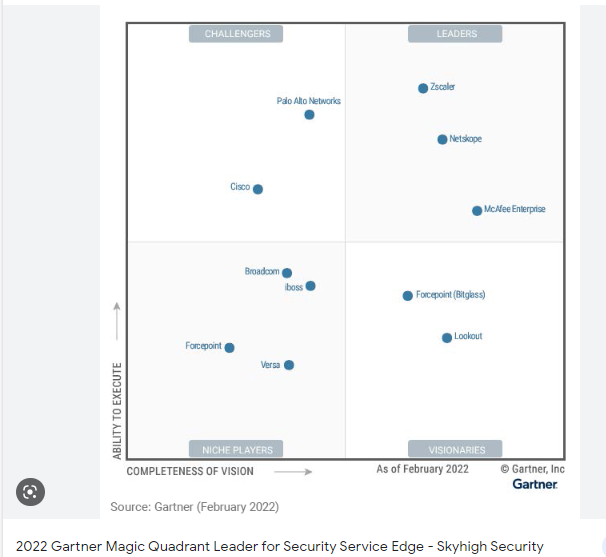
Gartner Magic Quadrant: NGFWs, SD-WAN and SSE:


Network security, cybersecurity, and information security are all related concepts, but they have slightly different meanings and scopes.
Network security refers to the protection of computer networks from unauthorized access or attacks. It involves the use of various hardware and software technologies to secure networks and prevent intruders from gaining access to sensitive information. Network security focuses on protecting the network infrastructure, such as routers, switches, firewalls, and other network devices, from attacks and intrusions.
Cybersecurity, on the other hand, is a broader term that encompasses network security as well as other aspects of security related to information technology. Cybersecurity involves the protection of computer systems, networks, and digital data from unauthorized access, theft, and damage. It includes a wide range of technologies, policies, and practices that are designed to secure digital assets and prevent cyber attacks.
Information security refers to the protection of all forms of information, including both digital and non-digital data, from unauthorized access, use, disclosure, modification, or destruction. Information security covers a wide range of topics, including confidentiality, integrity, availability, privacy, and compliance. It involves implementing appropriate controls and measures to safeguard information from various threats, such as cyber attacks, human error, and natural disasters.
Network and Security Certifications:
CCST Networking (Cisco)
Network+ (CompTIA)
CCNA (Cisco)
CCNP (Enterprise)
PCCET (Palo Alto)
PCNSA (Palo Alto)
PCNSE (Palo Alto)
NSE4 (Fortinet)
NSE5 (Fortinet)
NSE7 (Fortinet)
CCNP (Security) (Cisco)
F5 Admin (F5)
DevNet and Automation Certifications:
CCNA DevNet (Cisco)
ENAUTO (Cisco)
PCSAE (Palo Alto)
CyberSecurity Certifications:
Security+ (CompTIA)
CC (ISC2)
CCST Cybersecurity (Cisco)
CCNA CyberOps (Cisco)
CCNP CyberOps (Cisco)
Pentest+ (CompTIA)
CEH (EC-Council)
Linux+ (CompTIA)
CySA+ (CompTIA)
CASP+ (CompTIA)
SC-900 (Microsoft)
SC-200 (Microsoft)
SC-100 (Microsoft)
SASE, SSE and Cloud Security Certifications:
Cloud+ (CompTIA)
CCSP (ISC2)
AZ-900 (Microsoft)
AZ-500 (Microsoft)
PCCSE (Palo Alto)
Information Security Certifications:
CISSP (ISC2)
CISA (ICASA)
CISM (ICASA)
PECB ISO 27001 LE
CCISO (EC-Council)
- Network Consultant’s Handbook
- Palo Alto ACE/PCNSE
- Cisco CCNA/CCNP/CCIE Security
- Cisco CCNA/CCNP/CCIE Enterprise
- Checkpoint CCSA/CCSE
- Fortinet NSE4/NSE5
- Juniper SRX
- Cisco Meraki and Aruba APs
- VmWare
- CompTIA Linux+/LPIC1
- Microsoft MCSA
- HPE Switches
- Cisco CCNA/CCNP CyberOps
- Professional Services (PS)/Consultancies (Private)
 Network and CyberSecurity Professional