Category: VPN & Remote Access

Site-to-site and remote access VPNs: IPsec, GRE, DMVPN, GETVPN, AnyConnect, NAT-T and VPN troubleshooting across Cisco, Palo Alto, Check Point and Juniper.

  • GETVPN (Group Encrypted Transport VPN) Config (Commands)

    GETVPN is not used on public internet rather on a closed network e.g. MPLS where all the IP routing works becasue the header has the original internal source and destination IPs even after the ESP encrypted header.

    GM (Group Member): Encrypts and Forwards on the Data Plane
    KS (Key Server): Control Plane for IPSec (IKEv1 policy, IPsec transform set, IPsec Profile, Crypto ACL, Re-keying policy)
    TEK:Traffic Encryption Key (Encryption key between GMs for data traffic encryption
    KEK: Key Encryption Key (Encryption Key between GMs and KS using UDP port 848)
    GDOI (Group Domain Of Interpretation): Group Members Common Agreement
    COOP: Protocol used between primary and secondary key servers

    (Routing should needs to work fully before starting to configure GET VPN)

    KeyServer (R4):
    crypto isakmp policy 10
    enc aes 128
    hash sha256
    group 14
    authen pre-share
    exit

    crypto isakmp key Cisco123 address 0.0.0.0

    crypto ipsec transform-set Our-Transform-Set esp-aes esp-sha-hmac
    crypto ipsec profile Our-IPSec-Profile
    set transform-set Our-Transform-Set
    set security=association lifetime seconds 3600
    exit

    KS Key-Pair generation:
    crypto key generate rsa general-keys label KS-Keys mod 2048
    exportable

    ip access-list extended Our-List
    permit ip 10.0.0.0 0.255.255.255 10.0.0.0 0.255.255.255
    deny ip any any
    exit

    crypto gdoi group Our-GETVPN-Group
    identity number 6783

    server local
    address ipv4 4.4.4.4 (this is the loopback ip address)
    reley lifetime seconds 1800 (rekey the GMs)
    rekey retransmit 40 number 2
    rekey authentication mypubkey rsa KS-Keys
    rekey transport unicast
    sa ipsec 777 (it can be any number)

    profile Our-IPSec-Profile
    match address ipv4 Our-List
    replay time window-size 5
    end

    Group Member R1 (similar config except apply it to the correct exit interface):
    crypto isakmp policy 10
    enc aes 128
    hash sha256
    gruop 14
    authen pre-share
    exit

    crypto isakmp key Cisco123 address 0.0.0.0

    crypto gdoi group Our-GETVPN-Group
    identity number 6783
    server address ipv4 4.4.4.4

    crypto map GM-Map 10 gdoi
    set group Our-GETVPN-Group

    interface g0/1
    crypto map GM-Map

    Verification:
    ping x.x.x.x
    show ip route
    show crypto gdoi
    show crypto gdoi gm

    show crypto gdoi ks

    show crypto ipsec sa

    show crypto isakmp sa

  • DMVPN (Dynamic Multi Point VPN) Config (Commands)

    (Publically reachable IP addresses in a DMVPN is called NBMA (Non-Broadcast Multi Access) network)
    (mGRE (Multi Point GRE) is used instead of using separate tunnel interfaces for each router)
    (NHRP (Next Hop Resolution Protocol) is used to know each other’s next hop NBMA address. Also, helps building spoke to spoke dynamic tunnel if there is a route to both the spoke’s via a hub)
    (with DMVPN we don’t specify tunnel destinations, but we specify NHS (Next Hop Server))

    CONFIGURING THE DMVPN HUB – R1 ROUTER:
    interface GigabitEthernet0/0
    description LAN-Network
    ip address 10.1.0.1 255.0.0.0
    duplex auto
    speed auto
    !
    interface GigabitEthernet0/1
    description WAN-Network
    ip address 15.1.1.1 255.255.255.0
    duplex auto
    speed auto

    interface Tunnel0
    description mGRE – DMVPN Tunnel
    ip address 172.16.123.1 255.255.255.0
    ip mtu 1400
    ip tcp adjust-mss 1360
    tunnel source gig 0/1
    tunnel mode gre multipoint
    tunnel key 6783
    ip nhrp authen Cisco123
    ip nhrp map multicast dynamic
    ip nhrp network-id 123
    ip nhrp redirect (if pahse3 is supported based on the new IOS version or you can use ‘no ip next-hop-self’ on hub router to not use its ip advertised when advertising the spokes)
    no ip split-horizon eigrp 1
    end

    CONFIGURING THE DMVPN SPOKES – R2 & R3 ROUTERS:
    R2:

    interface GigabitEthernet0/0
    description LAN-Network
    ip address 10.2.0.2 255.0.0.0
    duplex auto
    speed auto
    !
    interface GigabitEthernet0/1
    description WAN-Network
    ip address 25.2.2.2 255.255.255.0
    duplex auto
    speed auto

    interface Tunnel0
    description DMVPN Spoke site R2
    ip address 172.16.123.2 255.255.255.0
    ip mtu 1400
    ip tcp adjust-mss 1360
    tunnel source gig 0/2
    tunnel mode gre multipoint
    tunnel key 6783
    ip nhrp authen Cisco123
    ip nhrp map 172.16.123.1 15.1.1.1
    ip nhrp map multicast 15.1.1.1
    ip nhrp network-id 123
    ip nhrp nhs 172.16.123.1
    ip nhrp shortcut
    end

    R3:
    interface GigabitEthernet0/0
    description LAN-Network
    ip address 10.3.0.3 255.0.0.0
    duplex auto
    speed auto
    !
    interface GigabitEthernet0/1
    description WAN-Network
    ip address 35.3.3.3 255.255.255.0
    duplex auto
    speed auto

    interface Tunnel0
    description DMVPN Spoke site R3
    ip address 172.16.123.3 255.255.255.0
    ip mtu 1400
    ip tcp adjust-mss 1360
    tunnel source gig 0/3
    tunnel mode gre multipoint
    tunnel key 6783
    ip nhrp authen Cisco123
    ip nhrp map 172.16.123.1 15.1.1.1
    ip nhrp map multicast 15.1.1.1
    ip nhrp network-id 123
    ip nhrp nhs 172.16.123.1
    ip nhrp shortcut
    end

    ROUTING BETWEEN DMVPN mGRE TUNNELS:
    R1(config)#router eigrp 1
    R1(config-router)#network 10.0.0.0
    R1(config-router)#network 172.16.123.0 0.0.0.255
    R1(config-router)#end

    R2(config)#router eigrp 1
    R2(config-router)#network 10.0.0.0
    R2(config-router)#network 172.16.123.0 0.0.0.255
    R2(config-router)#end

    R3(config)#router eigrp 1
    R3(config-router)#network 10.0.0.0
    R3(config-router)#network 172.16.123.0 0.0.0.255
    R3(config-router)#end

    PROTECTING – ENCRYPTING DMVPN MGRE TUNNELS WITH IPSEC:
    R1:

    crypto isakmp policy 1
    encr aes 256
    hash sha512
    authentication pre-share
    group 16
    lifetime 86400
    exit
    !
    crypto isakmp key Cisco123 address 0.0.0.0
    !
    crypto ipsec transform-set TS esp-aes 256 esp-sha512-hmac
    mode transport
    exit
    !
    crypto ipsec profile protect-gre
    set security-association lifetime seconds 86400
    set transform-set TS
    exit
    !
    interface Tunnel 0
    tunnel protection ipsec profile protect-gre
    end

    R2 and R3:
    encr aes 256
    hash sha512
    authentication pre-share
    group 16
    lifetime 86400
    exit
    !
    crypto isakmp key Cisco123 address 0.0.0.0
    !
    crypto ipsec transform-set TS esp-aes 256 esp-sha512-hmac
    mode transport
    exit
    !
    crypto ipsec profile protect-gre
    set security-association lifetime seconds 86400
    set transform-set TS
    exit
    !
    interface Tunnel 0
    tunnel protection ipsec profile protect-gre
    end

    Verification Commands:
    show run int tun 0
    show dmvpn
    show ip nhrp
    traceroute 10.3.0.50 source 10.2.0.2
    show crypto session
    show ip eigrp interfaces
    show ip route eigrp
    show ip route
    show ip cef 10.3.0.0
    show isakmp sa
    show ipsec sa
    show crypto engine connections active
    show crypto map
    show crypto
    debug nhrp

  • GRE (Generic Route Encapsulation) over IPSec VPN Configuration on a Cisco Router

    CREATING A CISCO GRE TUNNEL:
    R1(config)# interface Tunnel0
    R1(config-if)# ip address 10.12.12.1 255.255.255.0
    R1(config-if)# ip mtu 1400
    R1(config-if)# ip tcp adjust-mss 1360
    R1(config-if)# tunnel source 15.1.1.1
    R1(config-if)# tunnel destination 25.2.2.2

    ROUTING NETWORKS THROUGH THE GRE TUNNEL:
    R1(config)#route eigrp 1
    R1(config-router)#no auto-summary
    R1(config-router)#10.0.0.0 0.255.255.255
    R1(config-router)#end

    SECURING THE GRE TUNNEL WITH IPSEC:
    (GRE is not protected or encrypted so we use IPSec)
    CONFIGURE ISAKMP (IKE) – (ISAKMP PHASE 1):
    R1(config)# crypto isakmp policy 7
    R1(config-isakmp)# encr aes 256
    R1(config-isakmp)# hash sha256
    R1(config-isakmp)# authentication pre-share
    R1(config-isakmp)# group 5
    R1(config-isakmp)# lifetime 5000

    Create PSK:
    R1(config)# crypto isakmp key cisco123 address 0.0.0.0

    CREATE IPSEC TRANSFORM (ISAKMP PHASE 2 POLICY):
    R1(config)# crypto ipsec transform-set TS esp-aes 128 esp-sha384-hmac
    R1(cfg-crypto-trans)# mode tunnel

    (Old way was using crypto map and use an ACL for interesting traffic, but the new way is to use VTIs (VIrtual Tunnel Interface). Default mode for the tunnel is GRE but we will change it to IPSec and apply IPSec profile we created)

    Create IPSec Profile :
    R1(config)# crypto ipsec profile protect-gre
    R1(ipsec-profile)# set security-association lifetime seconds 86400
    R1(ipsec-profile)# set transform-set TS

    Apply it to the tunnel:
    R1(config)# interface Tunnel 0
    R1(config-if)# tunnel protection ipsec profile protect-gre

    Verification Commands:
    show run int tun 0
    show ip route
    show eigrp interfaces
    show crypto isakmp policy
    show crypto isakmp key
    show crypto engine connections active
    show crypto isakmp sa
    show crypto ipsec sa
    show crypto session

  • Site to Site VPN Config on a Cisco Router

    Config isakmp (IKE) – (ISAKMP PHASE 1):
    R1(config)# crypto isakmp policy 1
    R1(config-isakmp)# encr 3des
    R1(config-isakmp)# hash md5
    R1(config-isakmp)# authentication pre-share
    R1(config-isakmp)# group 2
    R1(config-isakmp)# lifetime 86400

    Config Pre-Shared Key – PSK:
    R1(config)# crypto isakmp key firewallcx address 1.1.1.2

    1. Create IPSec Transform (ISAKMP PHASE 2 POLICY):
      R1(config)# crypto ipsec transform-set TS esp-3des esp-md5-hmac
      R1(cfg-crypto-trans)#mode tunnel (by default it is tunnel mode so don’t have to specify)
    2. Create extended ACL (Interesting Traffic):
      R1(config)# ip access-list extended VPN-TRAFFIC
      R1(config-ext-nacl)# permit ip 10.10.10.0 0.0.0.255 20.20.20.0 0.0.0.255
    3. Create Crypto Map:
      R1(config)# crypto map CMAP 10 ipsec-isakmp
      R1(config-crypto-map)# set peer 1.1.1.2
      R1(config-crypto-map)# set transform-set TS
      R1(config-crypto-map)# match address VPN-TRAFFIC
      R1(config-crypto-map)# set pfs group 2
    4. Apply crypto map to the public interface:
      R1(config)# interface FastEthernet0/1
      R1(config- if)# crypto map CMAP

    Verification Commands:
    show run | section crypto
    show crypto isakmp policy
    show crypto map
    show crypto isakmp sa
    show crypto ipsec sa
    show crypto isakmp sa detail
    show crypto ipsec sa detail
    show crypto engine connections active
    debug crypto isakmp
    debug crypto ipsec

    Note: Limitations of IPsec Tunnel with Crypto maps is that we can not use Dynamic Routing Protocols over the tunnel so use GRE tunnel.

    Note: ESP (Encapsulating Security Payload) is protocol 50 and GRE (Generic Route Encryption) is protocol 47.

  • VPN Debugging Commands to extract .elg and .xml files for troubleshooting


    fwaccel off (turn SecureXL off)

    vpn debug trunc
    vpn debug on
    vpn debug on TDERROR_ALL_ALL=5

    Replicate the issue or wait for some time for VPN re-establishment

    vpn debug off

    vpn debug trunc off

    fwaccel on (turn SecureXL on)

    upload the following files to Checkpoint TAC so that they can run it inside their IKE utility:
    $FWDIR/log/ike.elg
    $FWDIR/log/vpnd.elg

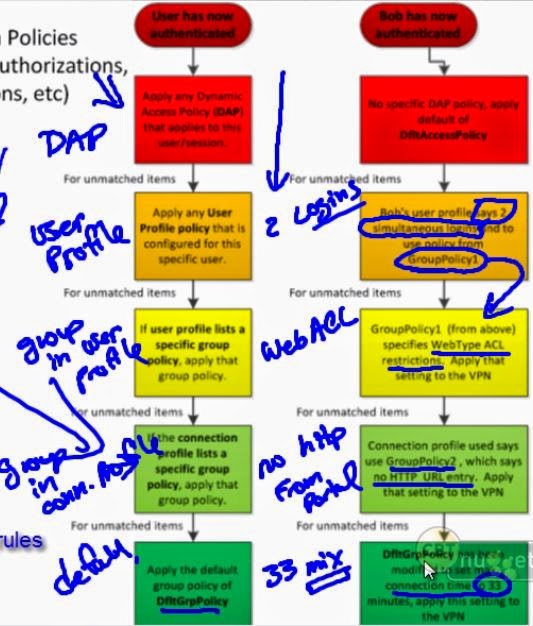
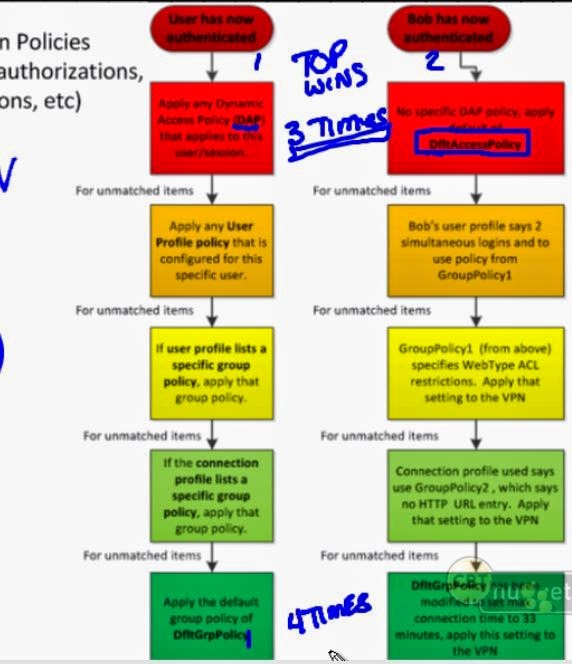
  • RA VPN Profiles and Policies Flow (Pre and Post Login)

    1.DAP rules (Dynamic Access Policy)(NAC)(e.g. if firewall present on client machine etc.)
    2.User Profile rules (User Account)(e.g. Two simultanous logins)
    3.User Profile Group rules (Group Policy attached to the User profile)(e.g. WebTypeACL)
    4.Connection Profile Group rules (selected at pre-login based on URL, Alias or Cert)(e.g. no http from portal)
    DefaultWebVPNGroup
    DefaultRAGroup
    Custom connection profile
    5.DfltGrpPolicy Group rules (e.g. connection time 33 mins)

    Connection Profile (aka Tunnel Group) controls the “Pre-logoin Policy”

    After login, ASA knows who the user is and post-login policies(permissions,authorizations,restrictions,etc) come. Top always win if there is conflict.

    Example flow.

  • Juniper SRX Commands (VPN TSHOOT) (Important)

    To see Phase1 and Phase2 of VPNs:
    user@host> show security ike security-associations
    user@host> show security ike active-peer

    user@host> show security ipsec security-associations

    To see the reason of tunnel inactivity:
    user@host> show security ipsec inactive-tunnels
    Configure syslog to display VPN status messages:
    # set system syslog file kmd-logs daemon info
    # set system syslog file kmd-logs match KMD
    # commit
    To see these VPN Logs:
    > show log kmd-logs

    > show security ike security-associations
    > show security ike security-associations index 3654851 detail
    > show security ipsec security-associations
    > show security ipsec security-associations index 131081 detail
    > show configuration | display set | match VPN_to_PEER_FIREWALL
    > show security ipsec security-associations index 131081
    > show security ipsec statistics index 131081
    > show security ipsec security-associations index 131081 detail

  • 3rd party VPN/Invalid ID information/No valid SA (Summary subnet sent)

    Scenario 1 – Wrong IPsec IDs are negotiated during IKE Quick Mode:
    Symptoms:
    “Invalid ID information” log in SmartView Tracker when the Security Gateway initiates a Quick Mode.
    “No valid SA” logs in SmartView Tracker when creating IPsec VPN tunnel with an interoperable device.
    Remote Access Client cannot access internal resources over the Site-to-Site tunnel with 3rd party VPN peer.

    Explanation:
    VPN tunnel can be initiated from 3rd party side to the Check Point Security Gateway side, but not from Check Point side to 3rd party side.
    During IKE Quick Mode negotiation, the IP addresses, which define the VPN tunnel (also known as IPSec IDs, or traffic selectors) are negotiated. The IP addresses can be a set of discrete IP addresses, or a subnet.
    When negotiating a VPN tunnel between Check Point Security Gateway and certain 3rd-party devices, IKE Quick Mode may fail, if the subnets are defined differently on each end of the VPN tunnel. One reason is that Check Point Security Gateway dynamically supernets subnets to reduce the amount of SA overhead.

    Solution:
    Define the IP ranges that the Check Point Security Gateway should negotiate with this 3rd party peer in the “subnet_for_range_and_peer” table in the relevant “user.def” file on the Security Management Server / Domain Management Server.

    The “subnet_for_range_and_peer” table is designed to force Check Point Security Gateway to negotiate IPsec SAs using a specific subnet mask for a given IP address range:

    subnet_for_range_and_peer = {
    <peerGW_IP, first_IP_in_range1, last_IP_in_the_range1; subnet_mask>,
    <peerGW_IP, first_IP_in_range2, last_IP_in_the_range2; subnet_mask>,
    … … …
    <peerGW_IP, first_IP_in_rangeN, last_IP_in_the_rangeN; subnet_mask>
    };


    Location of user.def file on the management:

    https://supportcenter.checkpoint.com/supportcenter/portal?eventSubmit_doGoviewsolutiondetails=&solutionid=sk98239